
EmDash Plugins Explained (and Why You Need Fewer Than WordPress)
EmDash has plugins, but it builds in much of what WordPress needs plugins for. Here's what comes built in, the two kinds of plugin, and when you'll pay to use them.
 By the AstroBeginner team. Reviewed by Ankur Gandhi, VP of WordPressPublished 7 minute readComplete beginner
Tested on Astro 7.4
In this guide
WordPress sites often run twenty or thirty plugins, and each one is a little more to update and a little more risk. EmDash has plugins too. But a lot of what WordPress needs a plugin for, EmDash does on its own.
What’s already built in
A new EmDash site starts with zero plugins:
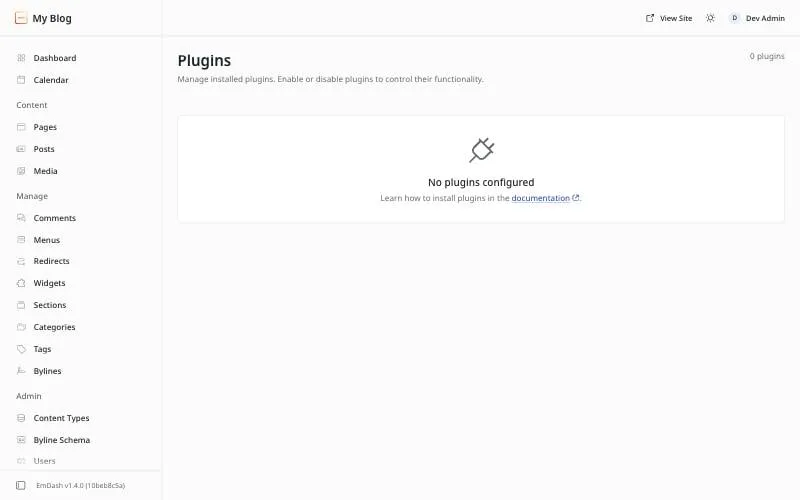
And yet it already does all of this:
| You’d want | In WordPress | In EmDash |
|---|---|---|
| SEO title, description and share image | A plugin | Built into every post |
| Redirects from old addresses | A plugin | The Redirects menu |
| Comments | Built in | Built in |
| Scheduled posts | Built in | Built in, with a Calendar |
| Old versions of a post | Built in | Revisions |
| Site search | Basic, or a plugin | Built into the templates |
| Secure sign-in without passwords | A plugin | Passkeys, by default |
| Moving from WordPress | A plugin | The Import menu |
| Caching and speed | A plugin | Handled by Cloudflare’s network, with caching options in EmDash’s docs |
| Keeping plugins in check | A security plugin | Sandboxed plugins can only do what they’re allowed. More below. |
The two kinds of plugin
When you do need one, EmDash has two kinds.
Sandboxed plugins run in a sealed-off box. Each one has to say up front what it wants to touch, like your posts, your images, or the internet. It can’t do anything else. You install these from the dashboard, like WordPress, and you see the list of permissions before you agree. This is the safer kind, and the kind EmDash recommends.
Native plugins run inside your site with full access, like a WordPress plugin. They can do more, like add pages to the dashboard or change how your site looks. A developer adds them in your project’s code, and they go live when you deploy.
| Sandboxed | Native | |
|---|---|---|
| How you add it | Install from the dashboard | Add to your code, then deploy |
| What it can touch | Only what it asked for | Everything |
| Where to find them | The registry at plugins.emdashcms.com | npm |
| Needs a paid plan on Cloudflare | Yes, Workers Paid | No |
The catch on Cloudflare: the sandbox costs $5
On Cloudflare, each sandboxed plugin runs as its own small Worker. That needs a Cloudflare feature called Worker Loader, which is only on the Workers Paid plan. It starts at $5 a month for your whole account.
That’s why EmDash’s Cloudflare templates leave the sandbox switched off. Your site deploys on the free plan, and the dashboard can show the registry, but installing a sandboxed plugin fails until you turn the sandbox on.
To turn it on when you create a site, add one option:
npm create emdash@latest my-site -- --sandboxed-pluginsTo turn it on later, follow EmDash’s plugin sandbox guide. It’s a few lines in two files.
On the Node.js platform, the sandbox runs on your own server instead, and there’s no extra plan to pay for.
How to install a plugin from the registry
Once the sandbox is on:
- In the dashboard, open Registry.
- Search for a plugin and open it.
- Read who made it and what it asks to access.
- Click Install, check the permissions again, and confirm.
A plugin asking to access everything is a reason to look twice, just like an app on your phone.
Should a beginner add plugins?
Not at first. Write a few posts, see what you actually miss, then look in the registry. Most small sites won’t need any.
Where to go next
- What EmDash costs to run, including the $5 plan.
- EmDash vs WordPress for the bigger picture.
- A tour of the dashboard.
Frequently asked questions
Can I use WordPress plugins in EmDash?
No. EmDash plugins are written differently. EmDash's docs have a guide for developers on porting a WordPress plugin, but you can't install one directly.
Where do I find EmDash plugins?
In the plugin registry, at plugins.emdashcms.com. On a site with the plugin sandbox switched on, a Registry section appears in the dashboard too.
Do plugins cost money?
The plugins themselves may be free. On Cloudflare, though, plugins from the registry run in a sandbox that needs the Workers Paid plan, which starts at $5 a month.
Stuck on a step?
Check the common errors guide, look up a word in the glossary, or ask the friendly people in the official Astro and EmDash Discords. How to ask so people can help.