
How to Put an EmDash Site Online With Cloudflare
We deployed EmDash to Cloudflare with one command in 27 seconds. Wrangler made the database, media storage and session store for us. Here are the exact steps.
 By the AstroBeginner team, reviewed by Seahawk MediaPublished 8 minute readComplete beginner
Tested on Astro 7.4
In this guide
EmDash was made by Cloudflare, and Cloudflare is the easiest place to put it online. You sign in once, then run one command. Cloudflare makes the database and the place your images live, all by itself.
What gets created
Your project has a file called wrangler.jsonc. It lists what your site needs from Cloudflare. When we deployed, Wrangler set up these:
| Name in your project | What Cloudflare gives it | What it’s for |
|---|---|---|
DB |
A D1 database | Your posts, pages, users and settings |
MEDIA |
An R2 bucket | Your uploaded images and files |
SESSION |
A KV store | Keeping you signed in |
IMAGES |
Cloudflare Images | Resizing pictures |
ASSETS |
Static files | Your site’s CSS, fonts and scripts |
You don’t make any of these by hand. Wrangler, Cloudflare’s command-line tool, created the database, the bucket and the session store on our first deploy, and reuses them after that.
Step 1: Sign in to Cloudflare from your terminal
In your project folder, run:
npx wrangler loginYour browser opens and asks you to let Wrangler use your Cloudflare account. Click Allow. Then go back to your terminal.
Step 2: Deploy
npm run deployThat one command builds your site, then uploads it. The first time, Wrangler also creates everything your site needs. Here’s the end of what we saw:
$ npm run deploy
Provisioning SESSION (KV Namespace)…
✨ SESSION provisioned 🎉
Provisioning DB (D1 Database)…
✨ DB provisioned 🎉
Provisioning MEDIA (R2 Bucket)…
✨ MEDIA provisioned 🎉
Uploaded astrobeginner-emdash-test (19.12 sec)
Deployed astrobeginner-emdash-test triggers (0.70 sec)
https://astrobeginner-emdash-test.ryan-9dc.workers.dev
schedule: * * * * *
The whole thing took 27 seconds. The last lines are your site’s address, ending in workers.dev, and the every-minute timer for scheduled posts.
Step 3: Finish setup on the live site
Open your new address and add /_emdash/admin to the end. You’ll see the same three-step setup wizard you saw on your computer:
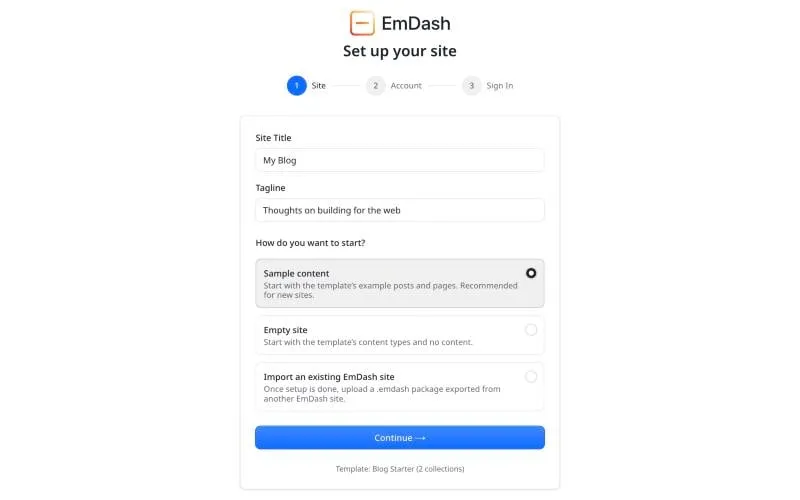
- Site. Type your site’s name and tagline. Choose Empty site if you’re starting for real, or Sample content to look around first.
- Account. Your email and your name.
- Sign in. Create a passkey.
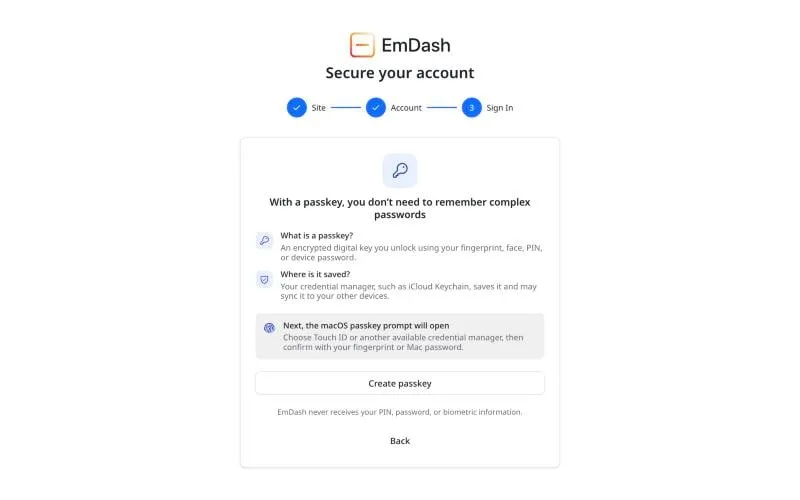
A passkey replaces a password. Your device asks for your fingerprint, face or PIN, and saves the key. There’s nothing to remember and nothing to steal.
Step 4: Check scheduled posts will work
EmDash publishes scheduled posts with a timer Cloudflare runs every minute. The template already has it switched on. To check, run:
npx emdash doctorIt looks at your project and tells you if the timer or its handler is missing.
Step 5: Use your own domain
In the Cloudflare dashboard, open Workers & Pages, pick your site, then Settings, Domains & Routes, and add your domain. If your domain’s DNS is already on Cloudflare, it works within minutes. How to register a domain covers the rest.
Updating your site later
Writing posts doesn’t need a deploy. You write in the dashboard and publish, and it’s live.
You only deploy again when you change the code, like the design or the templates. Run npm run deploy again. Your posts and images stay where they are.
If you picked Node.js instead
A Node.js EmDash site keeps its database in a SQLite file and its images in a folder. It runs on any server that runs Node.js, with npm run build then npm start. EmDash’s Node.js guide covers it. You can’t move a Node.js project to Cloudflare just by deploying it. Start a new project with the Cloudflare platform instead, and move your content across.
Where to go next
- What EmDash costs to run, including the free limits.
- Write your first post.
Frequently asked questions
Is it free to host EmDash on Cloudflare?
For most small sites, yes. EmDash's Cloudflare templates are set up to run on the Workers free plan. You need the $5 a month Workers Paid plan only for sandboxed plugins, or if your site outgrows the free limits.
Do I need to make the database myself?
No. When we deployed, Wrangler created the database, the media bucket and a session store by itself, using the names in wrangler.jsonc. Later deploys reuse them.
How long does it take?
Our first deploy took 27 seconds. The first visit to the new site then took 30 seconds while EmDash set up its database. After that, pages loaded in about a second.
Can I host EmDash somewhere other than Cloudflare?
Yes. Pick the Node.js platform when you create the project, and it runs on any server that runs Node.js, with SQLite for the database.
Stuck on a step?
Check the common errors guide, look up a word in the glossary, or ask the friendly people in the official Astro and EmDash Discords. How to ask so people can help.